
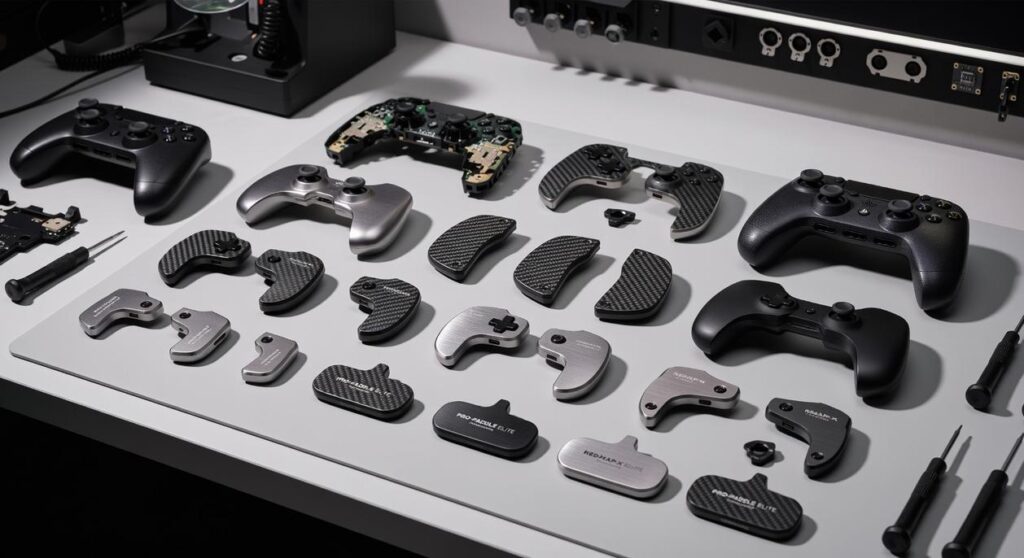
If you’ve ever felt like your skill has outgrown your setup, you’re not imagining it. Stock controllers are designed for the average player, not for high-stakes competition—creating hidden limits on reaction time, comfort, and consistency. This guide breaks down how controller customization for tournaments can transform your gameplay from casual to competitive. We’ll explore the precise hardware upgrades and software tweaks pro players rely on to gain measurable advantages in speed, accuracy, and control. If you’re looking for the modifications that actually impact wins—not just aesthetics—this roadmap will help you build a controller that feels like a true extension of your hands.
Mass-produced controllers promise to work for everyone. That’s the problem. When something is built for millions of hands, it’s optimized for averages, not for clutch moments. The One-Size-Fits-All Fallacy means you’re competing with gear designed for couch play, not championships (great for pizza night, less great for prize pools).
Consider input latency and wasted movement. Standard triggers often require full travel before activation, and thumbsticks have generous dead zones. Those milliseconds might sound tiny, but in competitive matches they’re the difference between landing the shot or watching the respawn screen. • Shorter trigger stops • Tighter stick tension • Faster actuation points
Then there’s ergonomic strain. Generic grips and smooth plastics can cause fatigue during long sessions. Cramps creep in, aim drifts, focus slips.
Some argue skill matters more than hardware. True. But controller customization for tournaments removes friction, letting talent shine. Your gear should elevate you, not babysit average.
Thumbsticks: The Core of Control
Thumbsticks determine whether your aim feels FLOATY or LASER-LOCKED. Adjustable tension systems let you increase or decrease resistance inside the stick module, which directly affects micro-adjustments in shooters. Higher tension can prevent overcorrection during long-range tracking, while lower tension supports faster flicks. Height also matters: domed sticks promote quick directional rolls, while concave tops cradle your thumb for added grip and stability. Taller sticks increase range of motion, translating to finer aim control because the same thumb movement results in smaller on-screen shifts. Anti-friction rings reduce plastic-on-plastic drag, creating smoother tracking during high-pressure engagements.
- Adjustable tension for precision
- Domed vs. concave grip profiles
- Anti-friction rings for smoother glide
Triggers and Bumpers: Speed is Everything
Milliseconds decide gunfights. Trigger stops physically limit how far a trigger can travel, shortening the distance between press and activation. Hair-trigger mechanisms go further by reducing the actuation point itself, meaning shots register almost instantly. In FPS titles, this lowers time-to-fire and can be the difference between trading eliminations and winning cleanly. Standard membrane bumpers rely on rubber compression, which feels softer and slightly delayed. Mechanical, clicky switches use tactile actuation similar to a gaming mouse, delivering immediate feedback and faster reset. That sharp CLICK isn’t cosmetic; it confirms activation without hesitation.
Back Paddles/Buttons: The Ultimate Game-Changer

Back paddles redefine how you move. Remappable rear inputs let you assign jump, slide, reload, or weapon swap to fingers that normally rest idle. The core advantage is simple: your thumbs never leave the sticks. That means constant camera control while performing advanced movement. In competitive play, this enables smoother strafing, jump-shot accuracy, and faster reaction chains. Many pros consider controller customization for tournaments essential because default layouts force split-second compromises between aiming and acting. With paddles, there’s no trade-off—just continuous control. Think of it like adding extra keys to a keyboard without increasing hand travel (efficiency wins championships).
Grips and Ergonomics: Comfort Equals Consistency
Performance drops when fatigue sets in. High-performance, non-slip grips use textured rubber or polymer blends to prevent slippage caused by sweat during intense matches. This preserves fine motor control deep into overtime rounds. Customized shell designs adjust palm swell, trigger reach, and weight distribution to match hand size and grip style—claw, palm, or hybrid. Ergonomic contouring reduces strain on wrists and finger joints, lowering the risk of repetitive stress injuries over long sessions. COMFORT isn’t a luxury; it’s a competitive variable. When your hands feel stable and supported, your mechanics stay consistent from first match to finals.
Software Tweaks vs. Hardware Mods: A Crucial Distinction
Onboard Software Customization
Start with what’s already in your settings menu. Button remapping (assigning different actions to different buttons), stick sensitivity curves (how fast your aim accelerates), and deadzones (the space a stick can move before input registers) can dramatically change performance.
For example:
- Lower deadzones for tighter aim in FPS titles.
- Create separate profiles for shooters and racing games.
- Adjust trigger sensitivity for faster actuation.
Many pros Use controller customization for tournaments before touching hardware. It’s reversible, flexible, and costs nothing. (And yes, sometimes the default layout really is the problem.)
The Physical Advantage of Hardware
Software can’t shorten a trigger’s physical travel. Trigger stops, taller thumbsticks, or rear paddles provide tactile speed advantages—measurable in milliseconds (which matters in competitive play).
Finding the Right Balance
Test software first. Once your layout feels natural, then commit to hardware upgrades. Pro tip: mirror insights from how to choose the best gaming mouse for competitive accuracy before locking into permanent mods.
Tailoring Your Build by Genre
Every genre rewards different inputs. It’s tempting to copy a pro’s setup and call it a day (because if it works for them, right?). But customization is contextual.
- FPS players benefit from hair-triggers, high-tension thumbsticks, and back paddles mapped to jump and slide for split-second reactions.
- Fighting game competitors need a responsive D-pad and tactile face buttons to execute tight combos under pressure.
- Racing sim drivers should adjust trigger tension and travel distance for nuanced throttle and brake control.
Some argue stock controllers are enough, especially for controller customization for tournaments. I disagree. Margins win games.
Building Your Ultimate Gaming Peripheral
You came here to build a controller that actually matches your skill—and now you have the blueprint to do exactly that. By focusing on smart upgrades instead of flashy extras, you’re removing the physical limits that hold back your reaction time, comfort, and consistency when the pressure spikes.
True controller customization for tournaments isn’t cosmetic—it’s competitive. Every added paddle, trigger stop, or grip adjustment closes the gap between intention and execution.
Start with the one upgrade that fixes your biggest in-game frustration. Don’t settle for stock performance. Upgrade today and turn your controller into a precision tool built to win.
 Ryan Chensanilo is the kind of writer who genuinely cannot publish something without checking it twice. Maybe three times. They came to emerging gaming news through years of hands-on work rather than theory, which means the things they writes about — Emerging Gaming News, Expert Breakdowns, Hunt Strategy Breakdowns, among other areas — are things they has actually tested, questioned, and revised opinions on more than once.